
 Log in
 Contact
 Forum
Forum
addBarcode

- addBarcode
- addBibliography
- addBookmark
- addBreak
- addCaption
- addChart
- addCitation
- addComment
- addCrossReference
- addDateAndHour
- addDropCap
- addEndnote
- addExternalFile
- addFootnote
- addFormElement
- addHeading
- addImage
- addIndex
- addLink
- addList
- addMathEquation
- addMergeField
- addOLE
- addOnlineVideo
- addPageNumber
- addRuby
- addShape
- addSimpleField
- addSource
- addStructuredDocumentTag
- addSVG
- addTab
- addTable
- addTableAuthorities
- addTableContents
- addTableFigures
- addText
- addTextBox
- addWordFragment
- addWordML
- embedHTML
- markEntry
- addBackgroundImage
- addFooter
- addFooterSection
- addHeader
- addHeaderSection
- addLineNumbering
- addMacroFromDoc
- addPageBorders
- addProperties
- addSection
- createDocx
- createDocxAndDownload
- createCharacterStyle
- createListStyle
- createParagraphStyle
- createTableStyle
- docxSettings
- embedFont
- importChartStyle
- importHeadersAndFooters
- importListStyle
- importStyles
- importStylesWordDefault
- importTheme
- modifyPageLayout
- parseStyles
- removeFooters
- removeHeaders
- setBackgroundColor
- setCompatibilityMode
- setDecimalSymbol
- setDefaultFont
- setDocumentDefaultStyles
- setEncodeUTF8
- setLanguage
- setMarkAsFinal
- setRTL
- clearBlocks
- cloneBlock
- deleteBlock
- getTemplateVariables
- getTemplateVariablesType
- modifyInputFields
- modifyMergeFields
- processTemplate
- removeTemplateVariable
- removeTemplateVariableImage
- replaceBlock
- replaceListVariable
- replacePlaceholderImage
- replaceTableVariable
- replaceVariableByExternalFile
- replaceVariableByHTML
- replaceVariableByText
- replaceVariableByWordFragment
- replaceVariableByWordML
- setTemplateSymbol
- setTemplateBlockSymbol
- tickCheckboxes

addBarcode
 TRIAL / ADVANCED / PREMIUM
Inserts a barcode field into the Word document.
Description
public addBarcode (string $content, string $type, array $switchers = array(), array $options = array() )
Compatible with MS Word 2013 and later.
Parameters
content
Hyperlink or text.
type
- QR
- CODE128
- CODE39
- JPPOST
- EAN8|EAN13
- JAN8|JAN13
- UPCA|UPCE
- NW7
- ITF14
- CASE
switchers
- \h value: height in twips of the barcode symbol.
- \s value: scaling factor of the barcode symbol. Percentage points from 10 to 1000.
- \q value: error correction level of QR Code. Valid values: 0 - 3. Default for QR if $switchers is empty: "\q 3".
- \p value: style of a Point of Sale barcode (barcode types UPCA|UPCE|EAN13|EAN8). Valid values: STD|SUP2|SUP5|CASE.
- \x: fixes the check digit if it’s invalid.
- \d: adds Start/Stop characters for barcode types NW7 and CODE39.
- \c value: style of a Case Code for barcode type ITF14. Valid values: STD|EXT|ADD.
- \r value: rotation of the barcode symbol. Valid values: 0 -3.
- \f value: foreground color of the barcode symbol. RGB.
- \b value: background color of the barcode symbol. RGB.
- \t: display barcode data (text) along with image.
options
Paragraph options. See addText.
Code samples
Example #1

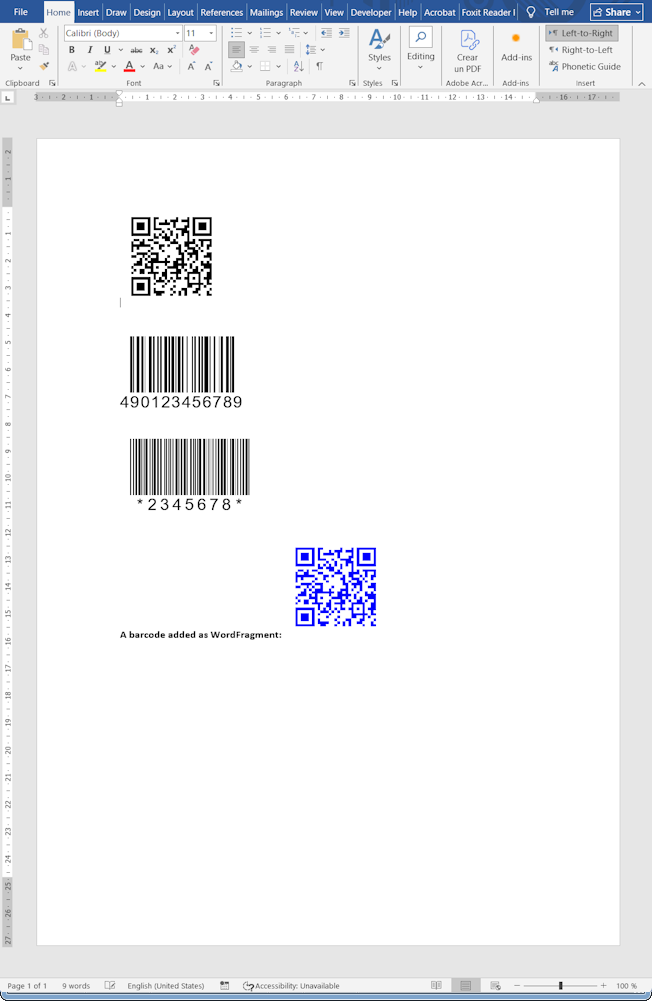
The resulting Word document looks like:
Release notes
- phpdocx 17.5:
- new method.